Sending options
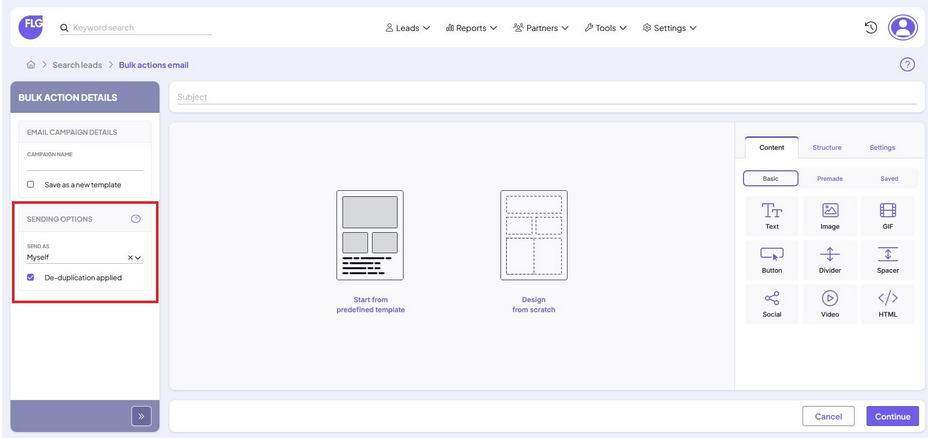
When sending a campaign in FLG, you can choose how the email should appear to recipients and whether to apply de-duplication. This guide explains the available options.
Choose the email sender
Under Sending options, select who the email should appear to come from:
Myself
- The email will show your name and details as the sender. This is the default option.
- Note: If your user account is set to send emails in the site’s name (rather than personally), the site’s details will be used instead of your own.
Associated Site
- The email will appear to be sent anonymously from the lead’s associated site, rather than a named user. The site’s details will be used as the sender.
Lead
- FLG will decide the sender based on each lead:
- If the lead is assigned to a user, the email will appear to come from that user (unless they are set to send as the site).
- If the lead is unassigned, the email will be sent anonymously using the details of the lead’s associated site.
- This option is useful if you’re sending on behalf of multiple users or sites and want the sender to vary automatically based on lead ownership.
- FLG will decide the sender based on each lead:
De-duplication
To avoid sending duplicate emails, de-duplication is applied by default.
This means:
- FLG will only send one email per unique contact (based on the email address), even if the same contact appears multiple times in your selected list.
- Cc and Bcc recipients are excluded from de-duplication. These fields are treated separately, and contacts listed there may still receive an email even if their address appears elsewhere.
You can leave de-duplication enabled to help protect against accidental duplicates in your campaign.
Need Further Assistance?
If you have any questions or require additional support:
- Visit our Help Centre for more articles and guides.
- Contact our support team via the Help option within the FLG platform.
Was this article helpful?
That’s Great!
Thank you for your feedback
Sorry! We couldn't be helpful
Thank you for your feedback
Feedback sent
We appreciate your effort and will try to fix the article